MamboCasa Property Management: A Landlord's Guide to the Platform, How to Use It and Why It Works
MSIXV · 2026-10-30 10:00:00
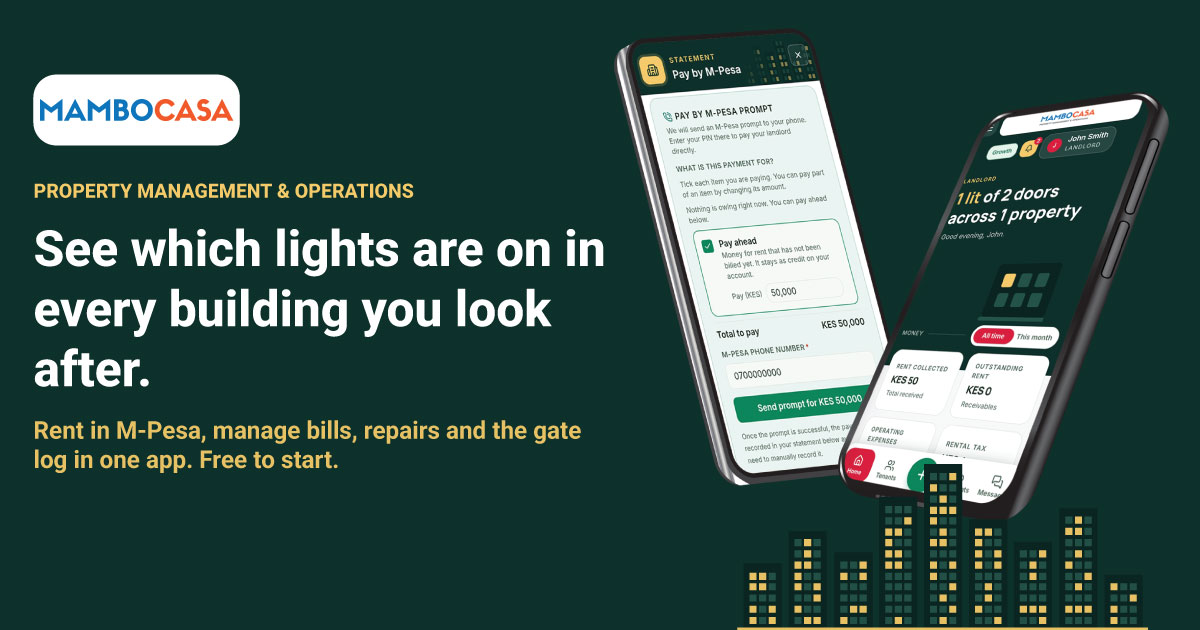
MamboCasa Property Management is a platform for running rental property in Kenya. Landlords use it to keep track of properties, units, tenants, leases, rent, bills, repairs and accounts. Tenants use it to see what they owe and to pay. Caretakers and gate staff get their own limited views.
It is now live on Google Play, and it also runs in any browser at pm.mambocasa.com. It is free to start.
Most small landlords already collect rent on M-Pesa.
What they lack is one place that records it properly.
This post explains what the platform does, how to get started, and where it is strong. It also says what it does not do, because a landlord choosing software should know that before signing up.
Who is it for?
One app serves four kinds of user, and each sees only what they need.
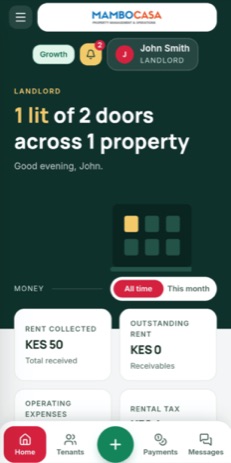
- Landlords manage properties, units, tenants, leases, rent and utility billing, maintenance and expenses, and keep the books.
- Tenants see their lease and statement, pay rent, report repairs, book amenities and message the landlord or caretaker.
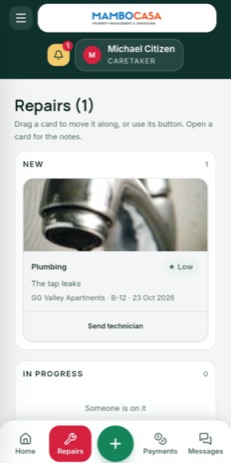
- Caretakers handle day-to-day operations: overdue balances, meter readings and utility billing, repair tickets and vendors.
- Security and gate staff keep visitor, vehicle, incident and patrol logs.
A landlord decides which properties each caretaker and gate account can see. A caretaker with no property assigned sees nothing. On each property a caretaker has one of three roles: Basic (repairs, the gate log and messages, with no money figures), Collector (adds rent payments and billing), or Manager (adds expenses and the property's ledger).
How do I get started?
- Create a landlord account. Download the app from Google Play or open pm.mambocasa.com, choose Landlord when you sign up, and confirm your email address with the code we send you.
- Add a property and its units. Enter each unit with its rent. The Free plan covers up to 3 units.
- Add your tenants and their leases. Tenants can also find you themselves. Under Link & sync you get a join code to give them. A tenant types it in, picks a free unit and sends a request, and you approve every request yourself.
- Tell tenants where to pay. On the M-Pesa page, save your paybill or till, or the personal number or Pochi la Biashara you collect on. Tenants then see your pay details on their screen.
- Bill and record. Raise rent, utility bills and late fees. When a payment comes in, record it or confirm what the tenant reports.
- Invite your caretaker and gate staff. Add them under Staff & team, tick the properties they look after and pick a role for each.
The app also has a Help overlay for each screen.
How do tenants pay?
There are three ways, and which one a landlord uses depends on how they collect rent today.
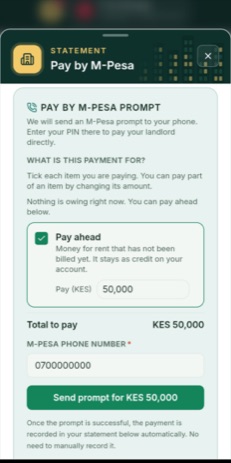
- M-Pesa prompt. If you connect your own paybill or till, a tenant can ask for a payment prompt on their phone from their statement page. The result is recorded against the right lease.
- Pay details plus a confirmation. Many small landlords collect on a personal number or Pochi la Biashara, which have no automatic connection. The tenant pays as usual, then reports the payment by pasting the start of the M-Pesa message. The app reads the code, amount and time, and cuts the text before the balance so that part is never kept. You confirm or reject the report.
- Automatic matching. With a paybill or till connected, payment notifications can be matched to leases automatically. Anything it cannot match with certainty waits for you in a list. It is never guessed.
One rule matters here: MamboCasa never holds rent money. Tenants pay the landlord directly, to the landlord's own number, till or paybill.
What are the advantages?
- Built for how rent is paid in Kenya. It works in shillings and around M-Pesa, including for landlords with no paybill.
- One record instead of a notebook and a spreadsheet. Rent, bills, repairs and expenses sit against the unit and the lease they belong to.
- Real bookkeeping. A double-entry ledger, a trial balance and a view of rental tax are built in. Balances are kept on the server, so a payment cannot be lost or counted twice.
- Roles that match real life. Tenants, caretakers and gate staff each see only their own part. A caretaker cannot see money unless the landlord allows it.
- Less chasing. A tenant can see what they owe and pay from the same screen, and the landlord sees at once who is in arrears.
- Works on a phone or in a browser. The same account works in the Android app and on the website.
- Free to start. The Free plan includes every core feature, including M-Pesa. Using your own branding is the one feature kept for the higher plans.
What does it not do?
- It does not collect rent on your behalf. Rent goes straight from the tenant to you. Collecting for landlords would need extra licensing, and it is not part of the product today.
- A personal number has no automation. M-Pesa does not offer an automatic connection for personal numbers or Pochi la Biashara, so those landlords confirm payments by hand. Automatic matching needs a paybill or till.
- It is not an accountant. The books and the rental tax view help you keep records. They do not replace advice from your own accountant.
What does it cost?
- Free: up to 3 units, KES 0.
- Growth: up to 30 units, KES 2,000 a month or KES 20,000 a year.
- Pro: up to 150 units, KES 7,000 a month or KES 70,000 a year.
- Portfolio: 151 units and above, in bands, from KES 10,000 a month or KES 100,000 a year.
A landlord can start a 30-day Growth trial once, when they reach a limit. If a paid plan ends, the account gets a 7-day grace period. After that it goes back to Free if it fits within Free's limits. If it does not, it becomes read-only until renewed. Nothing is deleted, and tenants can still pay and report payments. The current prices are always on the plans page.
Payment depends on where you subscribe. On the website you pay by card or M-Pesa, and a payment is one-off, so a plan does not renew by itself. In the Android app from Google Play you subscribe through Google Play, and the plan renews until you cancel it there.
Frequently asked questions
Is MamboCasa Property Management free?
Yes, to start. The Free plan covers up to 3 units and includes every core feature, including M-Pesa. Larger portfolios move to a paid plan.
Do I need a paybill or till to use it?
No. A paybill or till allows automatic payment matching and M-Pesa prompts, but landlords who collect on a personal number or Pochi la Biashara can save those details and confirm tenant-reported payments.
Does MamboCasa hold my rent money?
No. Tenants pay you directly, and the platform only keeps the records.
Can my tenants use it too?
Yes. Tenants have their own sign-in, where they see their lease and statement, pay or report rent, log repairs and message you. You approve each tenant who asks to join.
Is there an Android app?
Yes, on Google Play. The website at pm.mambocasa.com works in any browser with the same account.
Who makes it?
MamboCasa is a product of Mukiria Six Ventures Limited, the company behind MSIXV. You can read more on our About page.
Try it

Prefer a browser? Open pm.mambocasa.com. To learn more about the MamboCasa products, visit mambocasa.com.
Questions about the platform? Email support@mambocasa.com. If you need a system built around how your own business works, talk to MSIXV.